Homework 03 : Movie Database
In this homework, you will create an app that allows users to see a list of currently playing movies and display details about each movie. The app will make calls out to a public web API of movie data
Before you get started:
It is essential to understand the material in these tutorials.
* ViewModel CodeLab
* Navigation CodeLab
* LiveData CodeLab
* Android Room with a View CodeLab
* Make sure you have completed and understand any issues you had with Tutorial 04 and Challenge04.
In this assignment, you will build a minimalistic movie database. This app will use the Model-View-ModelView design pattern, where we will be reaching out across the internet with a coroutine to gather data from a public movie database, and then storing that data locally in a Room database on the device
You will be pulling the information about the currently playing movies from The Movie Database. The Movie Database publishes a public web API that is free to use. In order to access the data, you must register as a developer and retrieve an access token. See https://developers.themoviedb.org/3 for instructions for getting access. Next, you should test the access token and make sure you can retrieve a list of currently movies via the following link https://developers.themoviedb.org/3/movies/get-now-playing . The developer website allows you perform such tests directly on the page. You should be able to produce JSONs like this:
{
   "vote_count":902,
   "id":166426,
   "video":false,
   "vote_average":6.5,
   "title":"Pirates of the Caribbean: Dead Men Tell No Tales",
   "popularity":213.468872,
   "poster_path":"\/xbpSDU3p7YUGlu9Mr6Egg2Vweto.jpg",
   "original_language":"en",
   "original_title":"Pirates of the Caribbean: Dead Men Tell No Tales",
   "genre_ids":[
      28,
      12,
      35,
      14
   ],
   "backdrop_path":"\/3DVKG54lqYbdh8RNylXeCf4MBPw.jpg",
   "adult":false,
   "overview":"Captain Jack Sparrow searches for the trident of Poseidon while being pursued by an undead sea captain.",
   "release_date":"2017-05-23"
}
Note that there will be multiple pages worth of movies. You will need to only display 3 pages. You can pick any three pages (it doesn’t have to be the first three).
- On the application side, you will need to incorporate the following components:
- Navigation Component
- Fragment
- Retrofit2
- Room
- LiveData
- ViewModel
- RecyclerView
The application will need to feature two screens/fragments. The ‘home’ fragment (the one that shows when the user opens the app) will need to feature a list of currently playing in theaters (as per the JSON object that you will retrieve via the web). Tapping on any of the list items will need to open a fragment that will display more details about the selected movie. The list fragment, at a minimum, should display for each movie in the list a miniature poster, the title, and the IMDB rating. The detail fragment, at a minimum, should display a larger poster, a title, a release date, and an overview text.

- The list screen should allow the user (via dedicated controls in Section 1, see below) to:
- refresh the movie list (update the local copy of the list stored via Room)
- sort by rating
- sort by title.
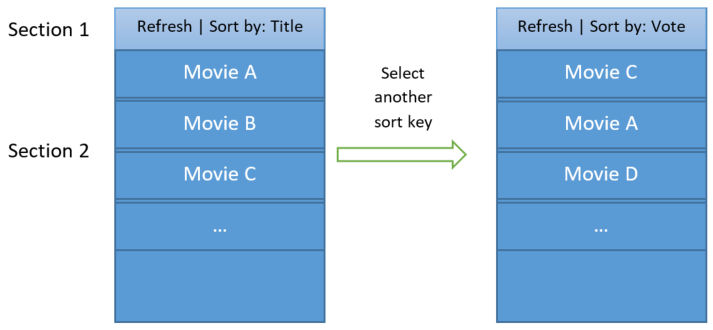
Upon the very first start-up, the app should download the list of movies into
Room. In all other cases, upon start-up, the app should retrieve the list fromRoomand display it. If a user chooses to refresh the list, the app should updateRoomwith the latest entries and update the UI. The detail screen shows information about the selected movie.The detail screen should allow users to “like”/“unlike” movies via the detail fragment. In the list fragment, the users should be able to apply a filter that will only show “liked” movies. Use appropriate controls in ‘Section 1’ to enable filtering.
The UI should neatly layout in either portrait or landscape mode. You should reuse the same fragments you create for each layout
Hint
To test if your app is loading the data from the local Room database correctly:
1. With the app connected to the internet, start the app and have it refresh from the movie database.
2. Now that you have data, turn off the internet in your emulator or device,
3. Rotate your device (virtual or physical). If the data is still there, then you know it loaded it from the Room database.